


Bitcoin Miner, BTC Mining
4.2113.00 Reviews
App Specs
- Version
- 11.0
- Updated On
- License
- Free
- Downloads
- 10,000+
- Developer
- Rayzen
- Categories
- Finance
- Platform
- Android
Screenshots
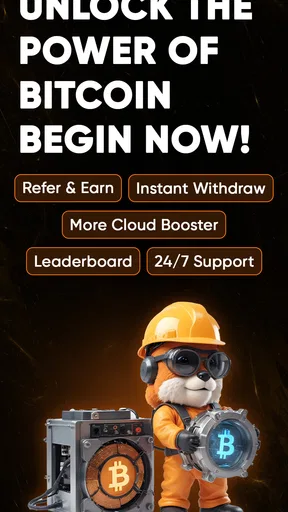
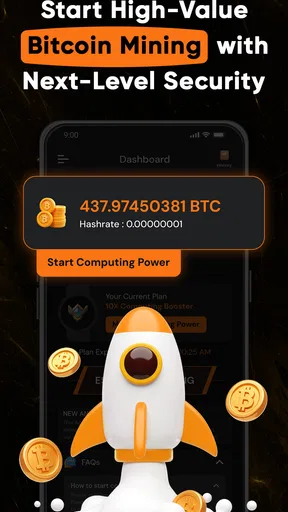
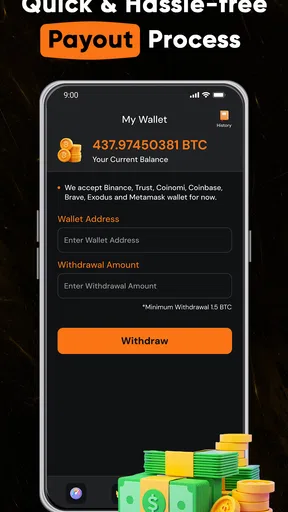
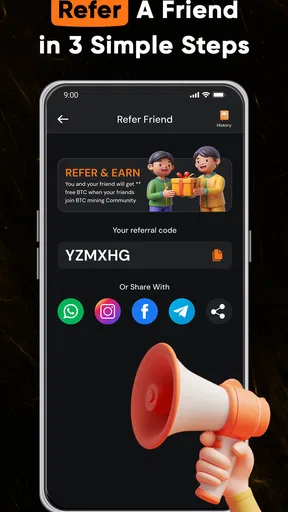
 Analysis by AppCompare
I approached Bitcoin Miner, BTC Mining as a finance app for people curious about earning Bitcoin without setting up mining equipment at home. Its core idea is easy to understand: use the app to follow cloud-mining activity and earnings, rather than run mining calculations on your phone. That distinction matters. If you expect your handset to become a miniature mining rig, this isn’t the experience you’re looking for; if you want a simple place to observe a mining-style balance, it may be worth exploring cautiously.
What the cloud-mining approach means in practice
Cloud mining can sound hands-off, but I would treat the dashboard as a way to monitor an activity, not as proof that an investment is safe or profitable. Bitcoin prices and mining economics can change, and a growing balance in an app is not the same thing as spendable Bitcoin in a wallet. Before putting money into any optional purchase, I’d look for clear explanations of what is being purchased, how earnings are calculated, and what conditions apply to withdrawing them.
That distinction also helps set expectations for everyday use. I wouldn’t keep the app open all day waiting for a dramatic change. A more sensible routine is to check it occasionally, note whether the displayed earnings move as expected, and compare that progress with any stated terms. If the app’s figures are hard to interpret, or if you can’t tell what a purchase changes, pause rather than paying simply to make the balance rise faster.
Who may find it useful—and who should look elsewhere
I can see the appeal for someone who wants a low-effort introduction to Bitcoin-related concepts and prefers a visual earnings tracker to reading about mining hardware. It may also suit a curious user who is comfortable treating the experience as an experiment, keeping expectations modest and spending nothing unless the terms make sense. Rayzen’s finance app is free to install, rated for Everyone, and has a 4.5 average from around 397 ratings, with over 10K installs. Those figures show that people are trying it, but they don’t establish that earnings are dependable or that every user will have the same experience.
I’d steer clear if your main goal is reliable income, direct control of mining equipment, or a straightforward way to buy and hold Bitcoin. A reputable exchange or self-custody wallet is a better fit for buying and managing actual cryptocurrency, while a conventional portfolio tracker is better if you only want to watch market prices. Those alternatives serve different purposes: this app centers on cloud-mining activity, so it shouldn’t be treated as a substitute for either.
Small checks that make the experience safer
One useful habit is to separate “activity shown in the app” from “funds I can access.” Before relying on an earnings screen, find out whether the balance is withdrawable, what minimums or fees might apply, and whether any identity or account steps are involved. I’d also save the wording of important terms when making a decision, so I can compare it with what the app displays later. These are basic checks, but they prevent a progress meter from being mistaken for a guaranteed payout.
Another practical trade-off is attention. Since cloud mining is not performed by the phone’s processor, keeping the app running constantly shouldn’t be necessary to make the concept useful. I’d check it at chosen intervals instead of repeatedly refreshing, and avoid making a payment because of urgency, a countdown, or a promise of quick returns. The app includes in-app purchases priced from $13.99 to $64.99 per item, so I’d review each purchase carefully and confirm what it provides before proceeding. The free download lets a newcomer inspect the experience first; there’s no need to treat spending as the default next step.
Worth Reading Before You Choose

Flipboard Shows What News Apps Must Do Beyond the Feed

Switching to Android Auto Means Rethinking Your Driving Routine

Google Calendar Makes a Crowded Week Easier to Manage

Ludo King Makes the Most of the Minutes Between Plans

Baby Panda World Brings Quick Play to Modern Phones, but Its Game Library Feels Busy

ESPN’s Live Game View Makes Following Close Games Easier
Getting Started with Bitcoin Miner
First things first, downloading the app was a breeze. Available on both Android and iOS, I found it easily on the app store. With a few taps, it was ready to go. The interface is clean, intuitive, and doesn’t bombard you with unnecessary info. It's all about getting the job done, which I appreciated right off the bat.
Setting Up Your Mining Journey
Once you open the app, you're prompted to set up your account. It was straightforward, requiring basic information. Within minutes, I was ready to start mining. The app offers a quick tutorial for newbies, which I found super helpful. It explained everything from how mining works to what I should expect in terms of rewards.
One feature I particularly liked was the user-friendly dashboard. You can easily track your mining progress, view your earnings, and see how your device is performing. It’s like having a mini mining control room right in your pocket!
The Mining Experience
Now, let's talk about the actual mining. The app is designed for cloud BTC mining, not Bitcoin calculations performed by your phone. That is an important difference: the handset is a window onto the activity and earnings, rather than the mining machine itself. I’d avoid interpreting a screen that appears active as evidence that your phone is contributing processing power or that a particular return is guaranteed.
As for earnings, they aren’t going to make you a millionaire overnight. However, it’s a fun and interesting way to dip your toes into the world of Bitcoin. Plus, there’s something satisfying about seeing your balance gradually increase!
Security and Support
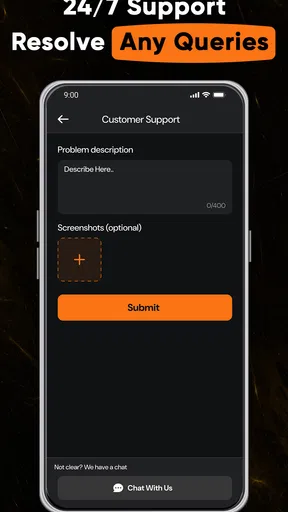
In the wild west of cryptocurrency, security is paramount. I was pleased to see that Bitcoin Miner, BTC Mining takes this seriously. The app offers two-factor authentication and encrypts your data, giving you peace of mind as you mine. The support team is also responsive. I had a couple of queries during my initial setup, and their support was prompt and helpful.
Questions worth settling before you rely on it
A common question is whether this is suitable for someone who has never mined before. I’d say it can be an approachable introduction if you treat the tutorial and dashboard as a learning aid, not as a promise of easy profit. The app is rated for Everyone, but that age label is not financial guidance; a younger or inexperienced user should have an adult help assess purchases and the risks of cryptocurrency-related services.
People also tend to wonder whether they need to leave the app open or keep their phone plugged in. Because the service is presented as cloud mining rather than device mining, phone processing power is not the point of the activity. I’d use the dashboard when I want to check progress rather than run it continuously, and I wouldn’t buy accessories or change phone settings on the assumption that doing so will increase earnings.
For a realistic routine, imagine checking the app during a weekly budget review. I’d compare the displayed balance with the previous check, read any notices about account terms, and decide whether the experience still makes sense before spending. If nothing has changed, that is useful information too: it’s a reason to keep expectations grounded, not to chase progress by purchasing an upgrade. A short, scheduled check is more informative than frequent refreshing because it reduces the temptation to react to every small movement.
Release, version, and the everyday fit
The app was released on July 21, 2025, and version 10.0 supports Android 7.0 and later. That makes it relevant to people using a range of Android devices, though I’d still check the current store page on my own phone before installing. The 133 written reviews offer more context than a rating alone, so I’d read recent comments for practical details about account access, earnings displays, and customer support rather than relying only on the overall score.
Compared with a standard Bitcoin wallet, this app is aimed at following cloud-mining activity rather than simply storing coins under your control. Compared with an exchange, it is not the obvious choice for placing a buy or sell order. And compared with mining software tied to dedicated hardware, it avoids asking the phone to do the computational work, but also does not give the user the same direct relationship with physical mining equipment. Choosing among these options depends on the goal: learn and observe here, manage coins in a wallet, trade through an exchange, or research hardware mining separately.
I would also make account control part of the decision. Use a password you don’t reuse elsewhere, enable two-factor authentication if it is available in your account flow, and keep recovery details private. Before sharing personal or payment information, read the app’s privacy and account terms in the places where they are presented. I wouldn’t assume that a security label or a polished interface answers every question about data handling; the useful test is whether the choices and explanations are clear enough for you to make an informed decision.
Final Verdict
So, who is Bitcoin Miner, BTC Mining really for? I’d say it’s perfect for those who are curious about cryptocurrency mining and want an easy entry point. It’s also great for those who enjoy exploring new tech trends. While it may not replace your day job, it’s a fun hobby that could lead to small earnings or just some digital bragging rights!
Overall, I found the app to be a solid and enjoyable experience. If you’ve ever wanted to try your hand at mining, but were unsure where to start, give this app a shot. Just remember to keep an eye on your phone’s battery, and happy mining!
My cautious recommendation
I’d try the free version only if I were comfortable learning about cloud mining without expecting a dependable return. The app’s focused dashboard and approachable format may suit a curious beginner, while someone seeking practical control over Bitcoin should choose a wallet or exchange that matches that goal. I’d also correct one important expectation: because this is cloud-based, phone battery life is not the central concern described by the original experience; the more important checks are account security, purchase terms, and whether any displayed earnings can actually be accessed.
In short, I’d use it as a window into a particular corner of cryptocurrency, not as a shortcut to income. Take time to understand the account choices, keep optional spending deliberate, and stop if the explanation of a balance or purchase doesn’t feel clear. With that cautious mindset, it can be an accessible way to explore the subject; without it, a conventional wallet or a no-cost educational resource is likely the better first step.
Pros
- User-friendly interface simplifies mining.
- Real-time updates on mining progress.
- Low resource consumption on devices.
- Supports multiple cryptocurrencies.
- Regular updates enhance performance.
Cons
- Requires stable internet connection.
- Potential for battery drain over time.
- Limited earnings for casual users.
- Ads may interrupt user experience.
- Withdrawals have minimum thresholds.
FAQs for Bitcoin Miner, BTC Mining
What is Bitcoin Miner, BTC Mining, and how does it work?
Bitcoin Miner, BTC Mining is an app that allows users to mine Bitcoin using their device. It utilizes the processing power of your smartphone or tablet to solve complex mathematical problems, contributing to the blockchain network in exchange for a small portion of Bitcoin. Users can track their mining progress and earnings directly through the app.
Is Bitcoin Miner, BTC Mining safe to use on my device?
While the app is designed to be safe, it's essential to download it only from official app stores like Google Play or the App Store to avoid malware. Additionally, mining can place a heavy load on your device's resources, which may lead to overheating or battery drain. Ensure your device is in good condition before using the app.
Does Bitcoin Miner, BTC Mining require an internet connection?
Yes, the app requires a stable internet connection to function effectively. It needs to communicate with the Bitcoin network to send and receive data. A reliable Wi-Fi connection is recommended to avoid excessive data usage, which can occur if you rely solely on mobile data.
How much Bitcoin can I earn with Bitcoin Miner, BTC Mining?
The earnings from Bitcoin Miner, BTC Mining are generally small and depend on various factors, including your device's processing power, the duration of mining, and the current difficulty of mining Bitcoin. It's important to have realistic expectations, as mining on mobile devices typically yields minimal returns compared to dedicated mining hardware.
Are there any costs associated with using Bitcoin Miner, BTC Mining?
While the app itself may be free to download, there could be associated costs such as increased electricity consumption and potential wear and tear on your device. Additionally, some features might require in-app purchases or a subscription. Always review the app's terms and conditions to understand any potential expenses.


